Pocket Family Beginner Guide: Solve Match-3 Puzzles and Build Your Dream Home
Pocket Family, listed on Google Play as Pocket Family Dreams: My Home, combines match-3 collapse puzzles with home decoration and a virtual family story. You help the family restore and improve its home by completing puzzle missions and responding to character requests. This beginner guide explains how the main systems connect and what to focus on when you first start playing.
1. Understand How Puzzles Support Home Building
The puzzle stages are not separate from the home-building experience. Completing puzzle missions helps you make progress on the family’s requests and gives you opportunities to improve the house.
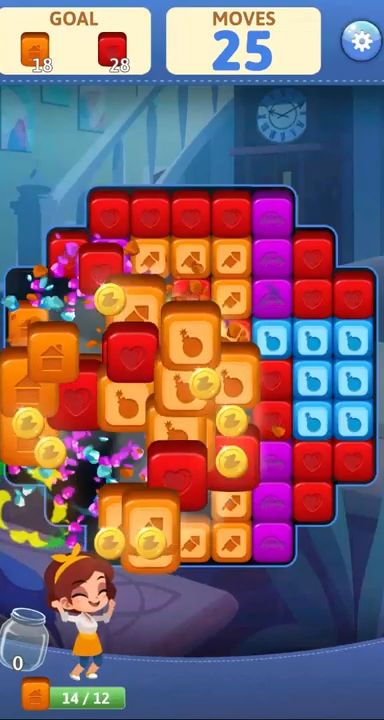
When you enter a puzzle, check the goal displayed at the top of the screen. Focus on the specific items or blocks required for that level rather than making moves without considering the objective.
2. Check the Level Goal Before Making Moves
Each puzzle can present a particular collection goal and a limited number of moves. Read the target requirements before tapping the board so you know which blocks matter for completing the stage.
Keep an eye on the remaining moves while working toward the goal. If a move does not contribute to collecting the required blocks, consider whether another available group would be more useful.
3. Learn the Match-3 Collapse Puzzle Style
Pocket Family describes its puzzle gameplay as match-3 collapse games. This is important because the board interaction is based on clearing groups of matching blocks rather than assuming that every puzzle uses the same swapping controls as a traditional match-3 game.
Look at the blocks currently connected on the board and identify groups that can help satisfy the level objective. The most useful move is usually the one that contributes directly to the required collection.
4. Complete Family Requests
The virtual family makes requests for household items and other activities. Completing puzzle missions helps you respond to these requests and continue developing the home.
Pay attention to the character or task currently asking for help. This gives you a clear reason to continue progressing through the puzzle stages and helps connect your puzzle activity with the family story.
5. Use Home Decoration to Personalize Rooms
Home decoration is a central feature of Pocket Family. The official game description highlights customized rooms, furnishings, wallpapers, flooring, and interactive decorations.
As you unlock decoration opportunities, explore the available choices and create rooms that match your preferred style. The game allows you to design and decorate the home rather than requiring every room to follow one fixed appearance.
6. Get to Know the Family Characters
Pocket Family features a cast of animated characters with different personalities and interests. The official listing mentions characters such as twins Dewey and Elroy, Great Uncle Oscar, and Cousin Ellie.
Character requests provide context for the activities you complete. Read the available requests and follow the tasks presented in the game to see how the family story develops.
7. Explore the Social Features
The official Google Play description also mentions sending gifts to a friend’s family for a chance to have more characters move into the house. If this feature is available in your version, review the in-game instructions to understand how gifting works.
Keep this feature separate from the main puzzle progression. Your primary starting focus should remain on completing puzzle missions and responding to the family’s requests.
Final Beginner Advice
To get started in Pocket Family, read each puzzle’s collection goals, clear useful groups of matching blocks, and complete the requests made by your virtual family. Use the progress you earn to develop and decorate the home. Understanding how puzzles, character requests, and room customization work together is the foundation of the game.
Find more Android game guides and beginner tutorials at Android Game Guides.