Planet Bomber! Beginner Guide: Learn Missile Controls, Upgrades, and Planet Progression
Planet Bomber! is an idle-style arcade simulation game from VOODOO. Your objective is to explore the galaxy and destroy planets while improving your bombing abilities and progressing toward tougher targets. If you are new to the game, understanding the upgrade system and how missiles interact with a planet will help you make better early decisions.
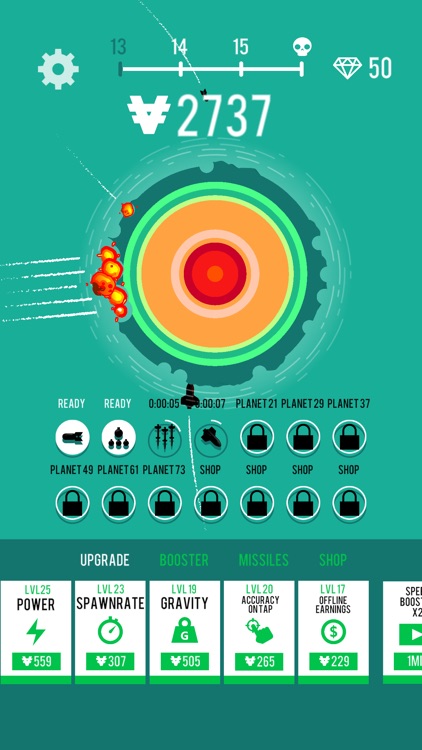
1. Understand the Main Gameplay Loop
The basic objective is straightforward: send missiles toward a planet and destroy it. As you progress, you encounter additional planets and stronger targets, including boss encounters.
Missiles attack the planet over time, while your available upgrades improve different parts of the bombing process. Your early goal is to understand how the current target responds to attacks and use the earnings from progress to improve your abilities.
2. Learn What Each Upgrade Does
The upgrade menu contains several categories that affect your bombing performance. Understanding their roles is more useful than purchasing upgrades without checking their descriptions.
- Power: Improves the damage or destructive area of your normal bombs.
- Spawn Rate: Increases how frequently bombs or missiles appear.
- Gravity: Changes the way missiles are drawn toward the planet.
- Accuracy on Tap: Improves how closely bombs follow the location you tap.
- Offline Earnings: Affects the earnings you receive while away from the game.
These upgrades improve different aspects of the game, so choose according to what is slowing down your current progress.
3. Prioritize Upgrades That Improve Planet Damage
Power is an important early upgrade because stronger bombs can make it easier to damage a planet. If your attacks are taking too long to destroy a target, improving power is a straightforward way to strengthen your bombing performance.
Spawn Rate can also help by increasing the frequency of attacks. Compare its cost with the benefit shown in the upgrade menu before spending a large portion of your currency on it.
4. Understand Gravity and Accuracy
Gravity and Accuracy on Tap affect how missiles approach their targets. If missiles are not reaching the intended area consistently, these upgrades can help improve the bombing process.
Accuracy on Tap is particularly relevant when you use the screen to influence where attacks are directed. Learn how the current control responds before spending heavily on accuracy upgrades.
5. Use Offline Earnings as a Supporting Feature
Planet Bomber! includes an Offline Earnings upgrade. This feature is intended to support progress when you are not actively playing.
Check the amount offered when you return to the game and compare it with the cost of your next upgrade. Treat offline income as an additional source of progress rather than assuming it will replace active play entirely.
6. Prepare for Boss Planets
The game includes boss encounters as part of its progression. These targets are intended to provide a tougher challenge than ordinary planets.
Before attempting a difficult target, review your available upgrades and strengthen the parts of your bombing system that need improvement. Pay attention to the current planet’s defenses and observe how your missiles perform during the encounter.
7. Keep Advancing Through New Planets
Destroying planets is the main way to move through the game’s progression. Continue improving your abilities as new targets become available. If progress slows down, return to the upgrade menu and identify which improvement would have the clearest effect on your current performance.
Final Beginner Advice
New players should first understand the five main upgrades in Planet Bomber!: Power, Spawn Rate, Gravity, Accuracy on Tap, and Offline Earnings. Improve damage and targeting when needed, pay attention to boss encounters, and use the earnings from progression to strengthen your bombing system.
For more Android game guides and beginner tutorials, visit Android Game Guides.