How to Unlock More Levels in Flex Run 3D
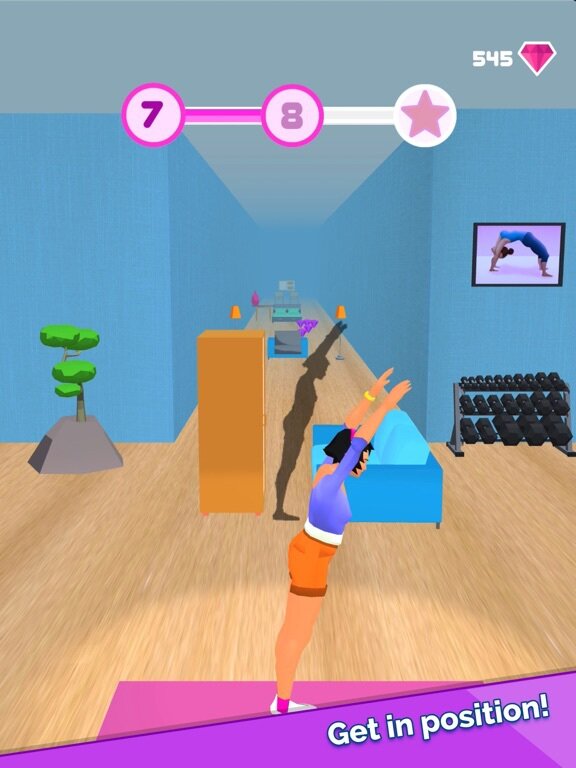
Flex Run 3D is a casual obstacle game built around flexible character movement. You slide your finger to change the character’s position and fit through incoming barriers. Its progression focuses on completing the obstacle stages rather than collecting a large set of equipment.
Complete the Current Stage
To keep progressing, focus on reaching the end of the current course without hitting the obstacles. Watch the shape and position of each barrier, then adjust your character before reaching it.
The controls are based on sliding your finger across the screen. Small adjustments can help you line up with narrow openings, while late movements may leave too little time to avoid a collision.
Read the Upcoming Obstacles
Do not wait until the character is directly beside a barrier before reacting. Look ahead and identify the space your character needs to fit through. This gives you more time to adjust your position.
- Check the shape of the next obstacle.
- Move the character into the required position early.
- Avoid unnecessary movements after lining up.
- Keep adjusting as the course introduces new barriers.
Keep Advancing Through the Course
The public description confirms the obstacle-based gameplay but does not document a separate level-unlock currency or a fixed requirement for later stages. The practical way to access further content is to keep completing the available course stages and follow the game’s level progression screen.
If a stage appears locked, check whether the previous stage has been completed and whether the game displays an additional requirement. Do not rely on unverified claims about a specific number of gems or a hidden character level.
FAQ
Do I need gems to unlock more levels?
The available public description does not confirm a gem requirement for level progression.
What is the main skill needed to progress?
Players need to adjust the character’s position in time to fit through the incoming obstacles.
For more casual game walkthroughs and Android tips, visit Android Game Guides.