How to Get Missiles in Planet Bomber!
If you want to unlock missiles in Planet Bomber!, the Google Play listing identifies a specific way to access them: the game’s Weekly Platinum Membership. The listing states that this subscription unlocks missiles, provides daily diamonds, and removes ads.
1. Open Planet Bomber! and Check the Subscription Offer
Start the game and look for the Platinum Membership offer. Review the benefits shown in the subscription screen and confirm that missiles are included before purchasing.
2. Subscribe to Weekly Platinum Membership
According to the Google Play listing, Weekly Platinum Membership unlocks missiles. The listing also describes additional benefits, including daily diamonds and ad removal.
The listed United States offer is $7.99 per week after a three-day free trial. Prices may differ in other countries, and the offer displayed in your Google Play account should be treated as the current price for your region.
3. Check Whether Missiles Are Unlocked
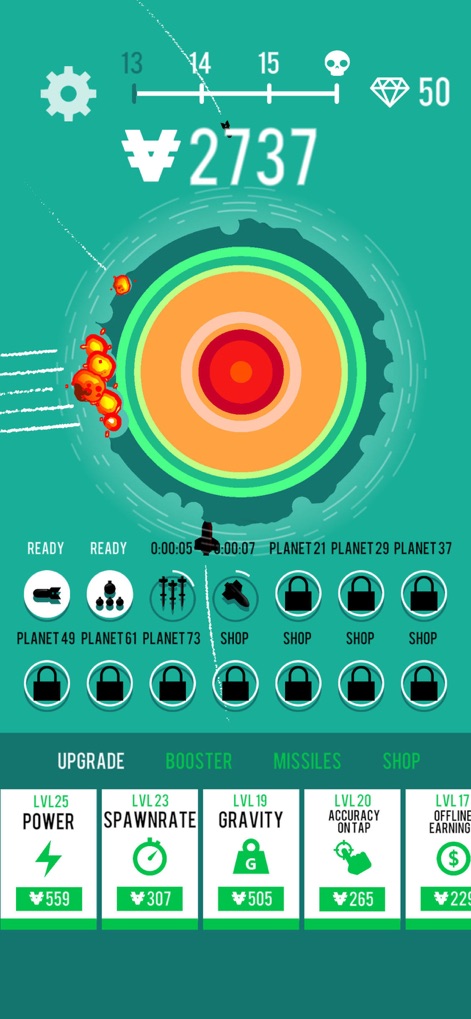
After completing the subscription process, return to the game and check the missile-related interface. The store listing confirms that the membership unlocks missiles, but it does not publish a detailed sequence of in-game steps for activating or using every missile feature.
If the missile option still appears unavailable, check that the subscription is active and that the game recognizes your Google Play purchase. Use the game’s purchase restoration or support options if available.
Can You Get Missiles for Free?
The public Google Play description identifies Platinum Membership as the way to unlock missiles. It does not document a separate free method, such as earning missiles from ordinary planet progression, collecting a particular number of diamonds, or defeating a specific boss.
Do not assume that upgrading Power, Spawn Rate, Gravity, or other abilities automatically unlocks missiles. These are separate upgrade options shown in the game interface.
Check the Subscription Renewal Terms
The listed membership is a recurring weekly subscription. Google Play explains that it renews automatically unless canceled at least 24 hours before the end of the current period. If you only want to try the free trial, review the renewal date and manage cancellation through your Google Play subscriptions.
For more Android game guides and tutorials, visit Android Game Guides.