Playtest Pro by BestPlay Tips and Tricks: Complete Game Tests and Track Your Rewards
Playtest Pro by BestPlay is a mobile gaming and feedback platform. It allows users to explore available games, complete activities, collect testing experience, and share feedback about products and services.
For Android users, the corresponding app is called BestPlay. The platform combines casual gaming with a reward system, so understanding task requirements and tracking progress are important parts of using it efficiently.
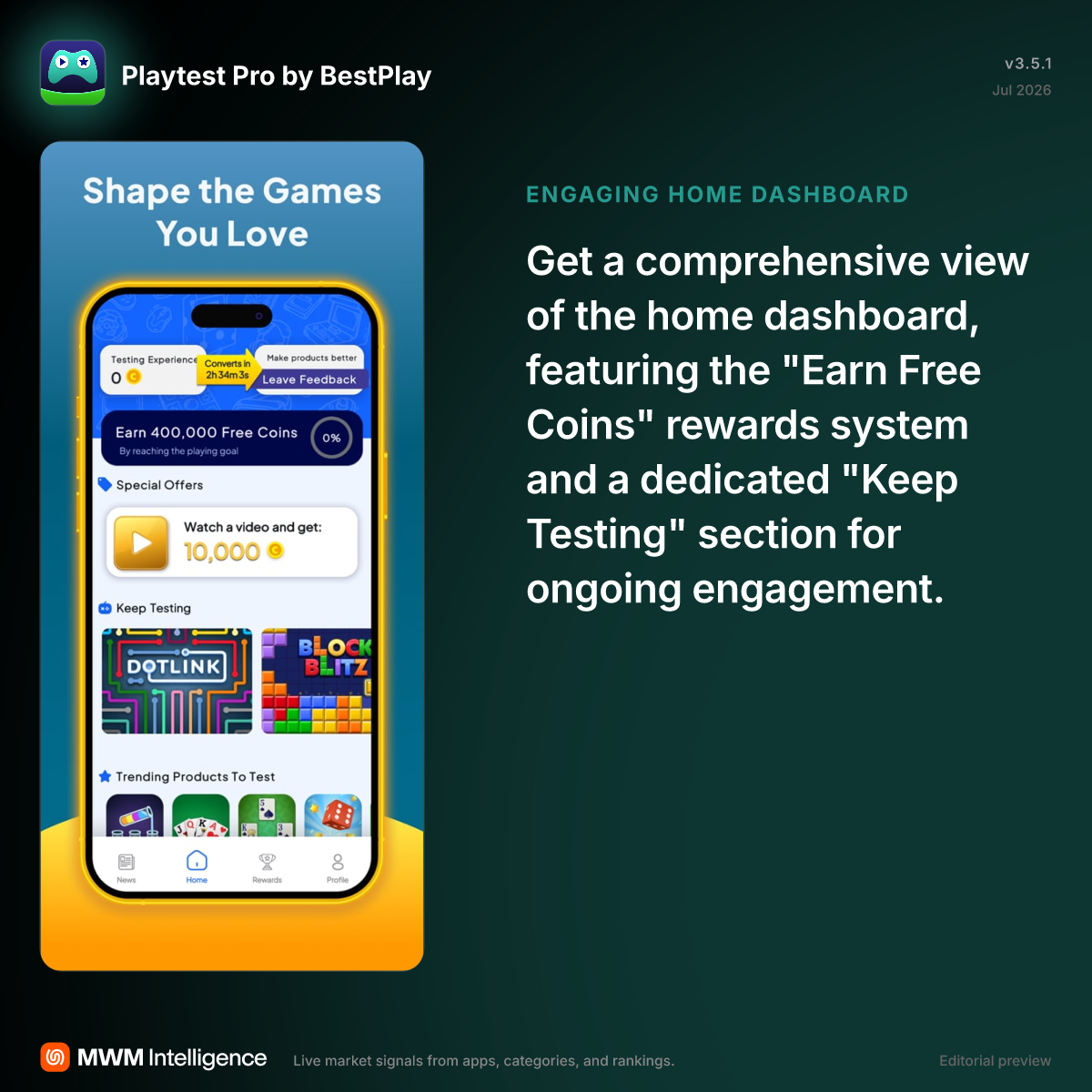
1. Understand the Available Tasks Before Starting
Start by reviewing the activities displayed in the app. Different games and testing opportunities may have different requirements.
Do not assume that simply opening a game completes its associated task. Read the instructions and understand what actions are needed before spending time on an activity.
- Review the available games.
- Check the requirements for each activity.
- Identify any completion conditions.
- Keep track of activities that are still in progress.
2. Keep Your Testing Progress Organized
Tracking progress helps you understand which activities have been completed and which still require attention.
After finishing an activity, return to the platform and check whether the progress has updated. If the expected progress does not appear, review the task requirements before repeating the activity.
Use a Simple Progress Routine
- Open the available testing activities.
- Choose one activity and read its requirements.
- Complete the requested actions.
- Return to the platform to review your progress.
- Check whether the activity has been recorded.
3. Read Feedback Requests Carefully
Playtest Pro is designed to collect user opinions about products and services. Providing useful feedback is therefore an important part of the platform.
When a feedback request appears, focus on the actual experience rather than submitting random responses. Describe what you observed and keep your answers relevant to the questions.
- Read each question before answering.
- Give feedback based on your actual experience.
- Avoid submitting unrelated comments.
- Review your answers before sending them.
4. Check Your Rewards and Available Bonuses
The platform includes a reward system that allows users to collect coins or testing-related rewards through eligible activities.
Check the rewards section regularly so you understand your current balance and available options. Some activities may also display special offers or additional reward opportunities.
Keep in mind that reward conditions can vary. Always read the displayed requirements instead of assuming every activity provides the same amount.
5. Maintain Your Daily Activity
Regularly checking the platform can help you discover new games and available activities. BestPlay also promotes daily streaks and bonus opportunities.
Rather than spending time on activities without checking their requirements, focus on those that fit your available time and interests.
- Check for newly available games.
- Review current tasks and their conditions.
- Keep track of daily activity rewards.
- Check your balance after completing eligible activities.
6. Keep Your Account and Activity Consistent
When an activity requires progress tracking, follow its instructions carefully. Avoid switching devices or interrupting a task if its conditions require you to complete the activity on the same device.
Keep the app updated and check its support information if an activity fails to register. Do not assume that an unrecorded task has been completed successfully.
Common Mistakes to Avoid
- Starting activities without reading their requirements.
- Assuming every game offers identical rewards.
- Ignoring progress updates after completing a task.
- Submitting feedback that does not answer the question.
- Overlooking reward conditions and redemption requirements.
FAQ
Is Playtest Pro by BestPlay a traditional mobile game?
No. It is a platform for accessing games, completing activities, and providing feedback rather than one standalone game with a fixed campaign.
What is the Android version called?
The corresponding Android application is called BestPlay.
How can you track your testing progress?
Return to the app after completing an activity and check whether the relevant task or progress indicator has updated.
How do you earn rewards?
Complete eligible activities and follow the requirements displayed by the platform.
Why should you read task requirements first?
Different activities can have different completion conditions. Reading them helps prevent wasted time and unrecorded progress.
Using Playtest Pro effectively requires more than simply opening games. Review each activity, follow its conditions, provide relevant feedback, and check your reward progress regularly. For more Android gaming platform guides and useful tutorials, visit AndroidGameGuides.com.