How to Unlock New Outfits in Hyper PA
How to Unlock New Outfits in Hyper PA
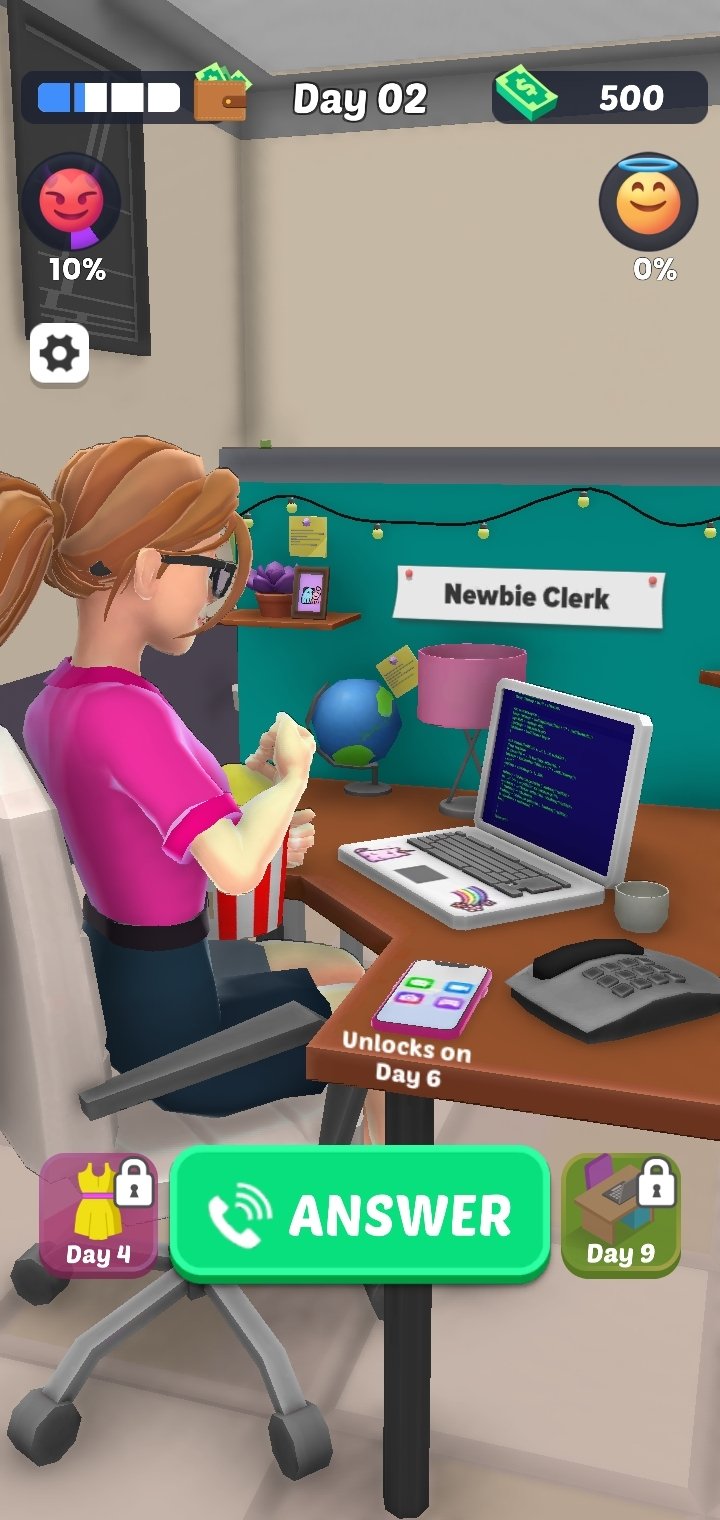
Hyper PA lets you customize your personal assistant with different outfits and appearance options. If you want to change your character’s clothing, you need to explore the game’s progression and customization features.
Progress Through Office Days
Hyper PA is built around office situations and interactive decisions. You answer phone calls, handle workplace problems, and choose how to respond to your boss.
Pay attention to the day indicators displayed in the game. Some locked customization options show a future day beside their icons.
Check Locked Outfit Requirements
Open the customization interface and review the available clothing options. Locked outfits may display a day requirement, giving you an indication of when the item becomes available.
- Open the outfit or customization screen.
- Find clothing options with lock icons.
- Check the day displayed beside each locked item.
- Continue playing through the office scenarios.
- Return to the customization screen to check availability.
Choose Your Personal Assistant’s Look
After an outfit becomes available, use the customization options to change your character’s appearance. Different clothing choices let you give your assistant a different look.
Remember that a locked outfit and an available outfit are different. Always check the item’s current status instead of assuming that every visible option can be selected immediately.
Frequently Asked Questions
Can you unlock new clothes in Hyper PA?
Yes. Outfit customization is one of the game’s advertised features.
Why do some outfits show a day number?
The interface displays day indicators for some locked options. Check the displayed requirement for each item.
Does Hyper PA include character customization?
Yes. Players can customize their personal assistant’s appearance and outfits.
Continue through the office scenarios and check your customization options as new items become available. Visit Android Game Guides for more Hyper PA guides.