Cribbage Pegboard Beginner Guide: How to Track Scores and Use the Discard Analyzer
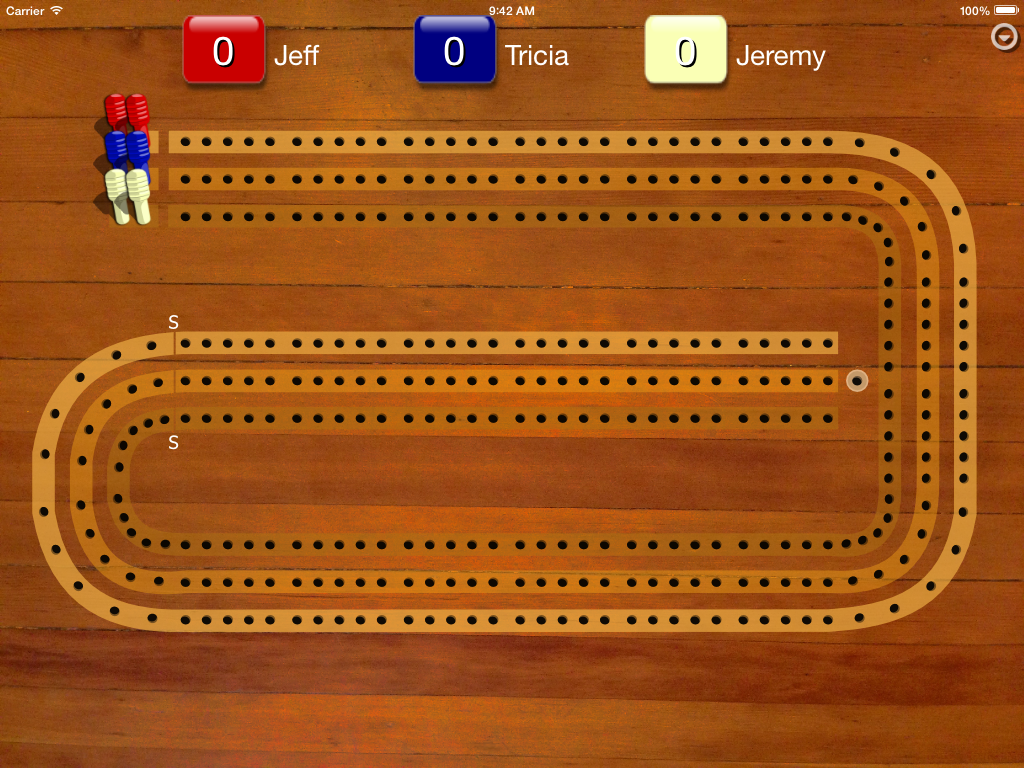
Cribbage Pegboard is a digital scoring companion for players who enjoy the traditional card game of cribbage. Instead of using a physical wooden board, you can move virtual pegs to track scores on your phone.
The app works with your own deck of cards and supports two or three players. It also includes a Discard Analyzer that helps you compare possible card combinations before deciding what to discard.
This beginner guide explains how to set up the scoring board, move pegs, track rivalries, and use the analyzer more effectively.
1. Set Up a Cribbage Game
Cribbage Pegboard is designed to keep score while you play cribbage with physical cards. You still need your own deck and players to participate in the card game.
The app supports both two-player and three-player games. Before starting, choose a suitable board and make sure the player tracks are correctly assigned.
- Choose a board: Select one of the available pegboard layouts.
- Set up the players: Use the appropriate board arrangement for two or three players.
- Prepare your cards: Use your own physical deck to play the actual card game.
- Keep the app available: Open the board so you can update scores during the game.
2. Track Scores by Moving the Pegs
The main purpose of Cribbage Pegboard is to make score tracking easier. Instead of moving physical pegs across a wooden board, you can drag the virtual pegs directly on your screen.
After calculating a player’s score during the card game, update the corresponding peg. Move it along the correct track to reflect the latest total.
- Identify which player earned the points.
- Find that player’s peg on the board.
- Drag the peg to the correct scoring position.
- Check the position before releasing it.
Be careful when moving pegs around curved sections. The spaces can be close together, so small movements help you select the intended position more accurately.
3. Use the Discard Analyzer
The Discard Analyzer is one of the app’s most useful additional features. It helps you evaluate different discard combinations from a cribbage hand.
Instead of relying only on intuition, you can compare the statistical results for each possible discard combination. The analyzer displays the minimum, maximum, and average scores, along with statistical information about possible flip-card results.
To make better use of this feature:
- Enter your hand: Provide the cards from the cribbage hand you want to evaluate.
- Compare discard combinations: Review the different possible choices.
- Check the average score: Use the average to understand the expected scoring potential.
- Review the minimum and maximum: Consider the range of possible outcomes.
- Make your decision: Choose a discard based on the results and your game situation.
Remember that the analyzer provides statistical guidance rather than a guaranteed winning move. The best discard can also depend on the current match situation and the cards held by other players.
4. Keep Track of Rivalries
Cribbage Pegboard can automatically remember rivalry results. This feature helps you follow your overall record against friends across multiple games.
Instead of manually recording every result elsewhere, use the app’s saved rivalry information to review your history. It can make casual matches and recurring competitions easier to track.
- Use the same player identities when tracking recurring matches.
- Update the board consistently during each game.
- Check saved rivalry results when comparing past performance.
5. Choose a Board That Suits Your Game
The app offers multiple board layouts. Different layouts give you options for organizing the scoring tracks and displaying player progress.
If you usually play with two people, choose a layout that makes both tracks easy to follow. For three-player games, use a suitable board and check each player’s position carefully.
Take a moment to become familiar with the selected layout before starting a match. This reduces mistakes when updating scores during faster rounds.
Beginner Tips for Cribbage Pegboard
- Check peg positions: Make sure each peg lands on the intended scoring hole.
- Update scores promptly: Record points after each scoring opportunity.
- Use the analyzer: Compare discard combinations when you are unsure which cards to keep.
- Review score ranges: Consider minimum, maximum, and average results instead of relying on one number.
- Track rivalries: Use the saved results to follow your long-term performance against friends.
Frequently Asked Questions
Is Cribbage Pegboard a complete card game?
No. It is primarily a digital scoring board. You use your own cards to play cribbage and use the app to track the scores.
How many players does Cribbage Pegboard support?
The app supports two-player and three-player cribbage games.
How do you move the pegs?
Drag a virtual peg along its scoring track and release it at the correct position.
What does the Discard Analyzer do?
It compares possible discard combinations and displays their minimum, maximum, and average scores, together with statistical information about possible flip-card results.
Does Cribbage Pegboard remember previous games?
Yes. The app automatically remembers rivalry results so you can follow your overall record against friends.
Final Thoughts
Cribbage Pegboard makes traditional cribbage scorekeeping more convenient by replacing a physical pegboard with a digital version. Its drag-and-drop controls, multiple board layouts, rivalry tracking, and Discard Analyzer provide useful tools for regular players.
Learn how to move the pegs accurately and use the analyzer to compare your discard options. For more Android game guides, tips, and walkthroughs, visit AndroidGameGuides.com.