Cribbage Pegboard Beginner Guide: How to Track Scores and Use the Digital Board
Cribbage Pegboard is a digital scoring board for the traditional card game Cribbage. It is designed to be used alongside your own physical playing cards, allowing you to track scores on your phone instead of using a traditional wooden pegboard.
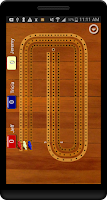
1. Understand What the App Does
Cribbage Pegboard is primarily a scorekeeping tool. You still use your own cards to play Cribbage, while the app provides a digital board for tracking the points earned during the game.
The app supports two or three players and offers multiple board designs.
2. Set Up Your Players
Before starting a game, make sure the correct number of players is represented on the board.
Cribbage Pegboard supports two-player and three-player games. Choose the appropriate setup so that each player’s score can be tracked separately.
3. Learn the Basic Scoring Rules
Cribbage scoring is based on combinations formed by cards in a player’s hand and the starter card. Common scoring combinations include:
- Fifteen: A combination of cards that adds up to 15 scores two points.
- Pairs: Two cards of the same rank score two points.
- Runs: Consecutive cards score points according to the length of the run.
- Flush: Certain same-suit combinations can score points.
- Nobs: A jack in the player’s hand that matches the starter card’s suit scores one point.
Understanding these combinations helps you calculate the score before entering it on the digital board.
4. Move the Pegs to Track Scores
The app allows players to drag and drop pegs on the board. After calculating a scoring combination, update the appropriate player’s position.
Check the score before moving a peg so that the digital board accurately reflects the current game.
5. Review Previous Results
Cribbage Pegboard can remember rivalry results, allowing players to keep track of their overall records against friends.
This feature is useful if you regularly play with the same people and want to review previous match results.
6. Use the Discard Analyzer
The app also includes a Discard Analyzer. It can evaluate possible discards from a Cribbage hand and show minimum, maximum, and average scores for different discard combinations.
Use the analyzer to explore possible outcomes and understand how different discard choices can affect a hand.
Beginner Tips for Cribbage Pegboard
- Use your own physical cards to play Cribbage.
- Select the correct player setup before starting.
- Learn the basic scoring combinations.
- Move the correct player’s pegs after calculating points.
- Use the Discard Analyzer to study possible discard choices.
- Review saved rivalry results when playing with regular opponents.
Final Thoughts
Cribbage Pegboard makes it easier to keep track of scores during a traditional Cribbage game. Beginners should learn the scoring rules first, then use the digital board to record points and follow each player’s progress.