How to Change Controls in Ultimate Pro Football GM
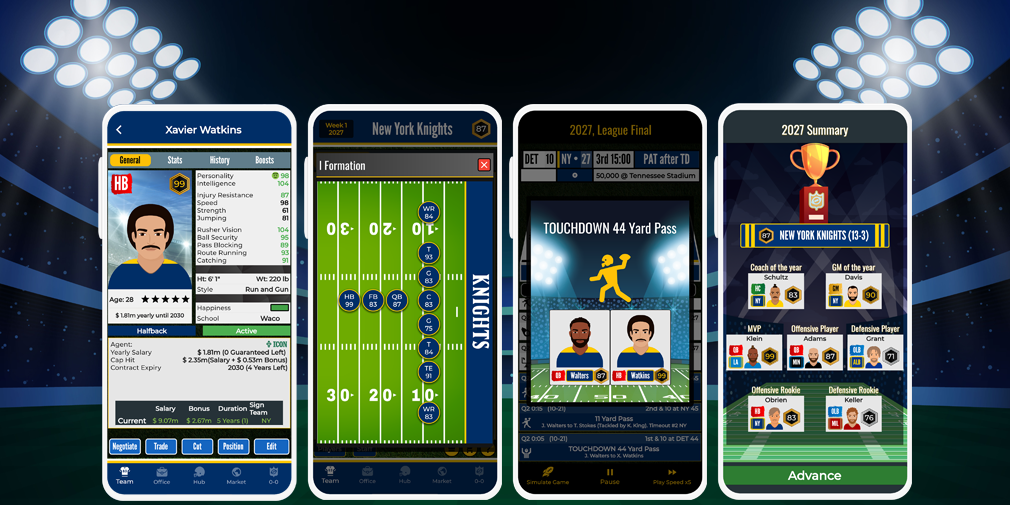
Ultimate Pro Football GM is a football management simulation game. Players manage their roster, coaches, finances, and franchise operations. Coach Mode also includes play-calling features, so it is important to distinguish management settings from gameplay controls.
Understand the Game’s Main Controls
The game focuses on selecting management actions through its interface. You can sign and trade players, draft rookies, hire staff, upgrade facilities, and manage finances. These are menu-based management activities rather than a traditional movement controller.
Check Coach Mode Options
Coach Mode includes offensive play calling. The game’s update history also lists defensive play-calling and defense playbook creation. Open the relevant Coach Mode screens to review the available options in your version.
Can You Remap the Controls?
The official Google Play description and update information do not document a customizable button-mapping system. They describe management functions and play-calling features, but do not confirm that players can assign new buttons to these actions.
If you want to change how the interface behaves, review the settings available in your installed version. Do not confuse roster or playbook settings with control customization.
FAQ
Does Ultimate Pro Football GM use traditional movement controls?
No. It is primarily a management simulation with menu-based team and franchise decisions.
Can I change offensive play calls?
Coach Mode includes offensive play calling. This is a gameplay option, not proof of customizable button mapping.
Can I remap the game’s buttons?
A button-remapping feature is not confirmed in the available official game information.
Explore more Android sports game guides at androidgameguides.com.