June’s Journey: Hidden Objects Beginner Guide for Android – How to Find Items and Progress
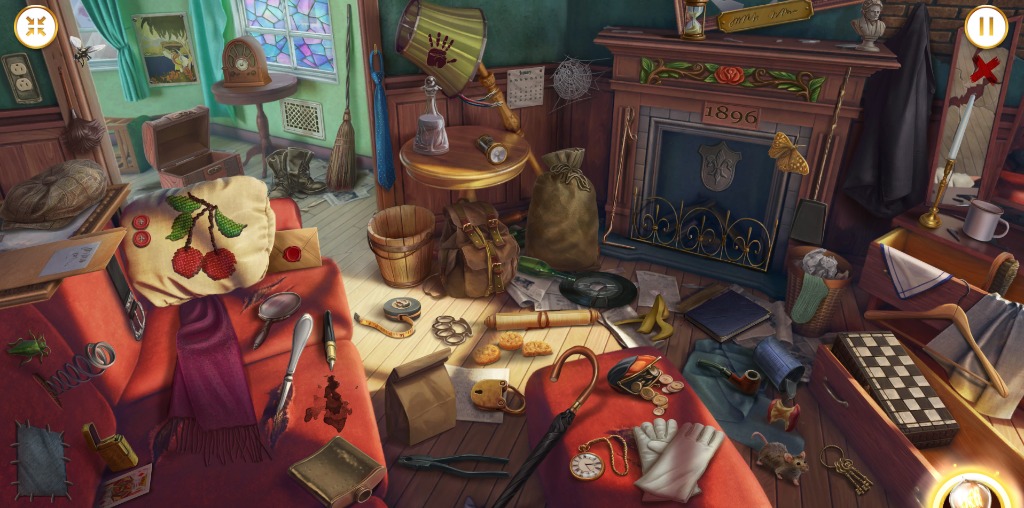
June’s Journey: Hidden Objects is a mystery puzzle game for Android. Players search detailed pictures for listed objects, discover clues, and follow June’s story. The game also includes an estate on Orchid Island that you can build, decorate, and expand.
Learn How Hidden Object Scenes Work
Each Hidden Object Scene shows a picture containing many items. A list at the bottom of the screen tells you what to find. Tap an object when you spot it, and continue until every item on the list has been found.
Finding objects quickly increases your score. However, tapping the wrong object or an empty area can reduce your points. Look carefully before tapping instead of guessing.
Use Hints When You Get Stuck
If you cannot find an item, tap the light bulb in the bottom-right corner. This hint highlights an object from your list. Hints are free, but each use requires time to recharge.
- Read the object list before searching.
- Scan the picture carefully.
- Avoid tapping objects that do not match the list.
- Use the light bulb when you cannot find an item.
Earn Stars and Discover Clues
You can earn up to five Stars in each Hidden Object Scene. Each additional Star requires more points than the previous one. Stars help you progress, claim Star Boxes, and uncover more of the story.
Scenes also contain story clues. You find the first clue the first time you play a new scene. The second clue becomes available after you earn the third Star and play that scene again.
Unlock More Chapters and Scenes
Each chapter contains five Hidden Object Scenes and a final Adventure Scene. Adventure Scenes use more puzzle-oriented gameplay and do not provide a time bonus for finishing quickly.
To unlock new Hidden Object Scenes, you need enough Flowers from decorating Orchid Island and both clues from the previous scene. This connects puzzle progress with estate development.
FAQ
How do you find objects?
Check the list at the bottom of the screen and tap each matching object in the picture.
Do wrong taps affect your score?
Yes. Tapping an incorrect object or an empty area costs points.
How many Stars can you earn in a scene?
You can earn up to five Stars in each scene.
For more Android hidden-object and mystery game guides, visit androidgameguides.com.