
Truck Simulator PRO USA Tips for Beginners – How to Drive and Deliver Cargo
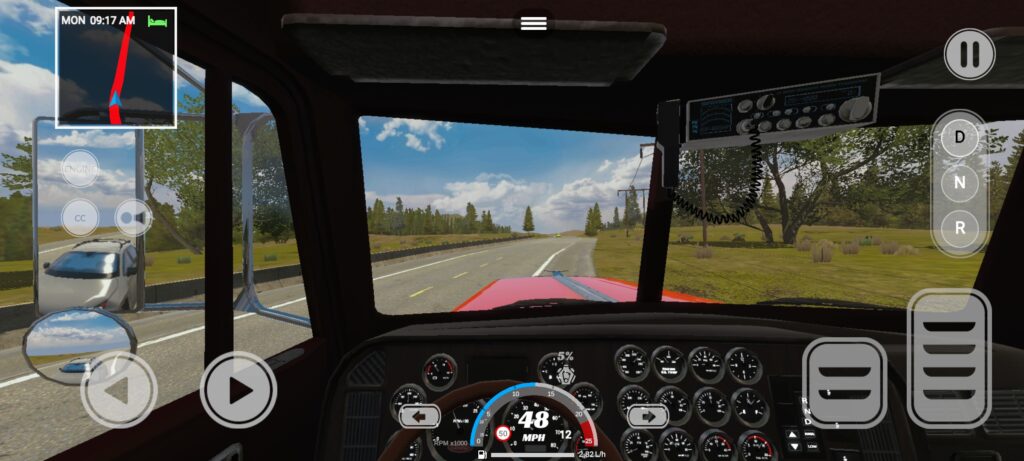
Truck Simulator PRO USA is a truck driving simulator set across a large map of the United States. Players transport cargo, drive American semi trucks, manage fuel, and build a trucking company. Beginners should learn the driving controls and delivery process before taking on longer routes.
Learn the Truck Controls
The game offers a cockpit view and realistic vehicle handling. You can use tilt, buttons, or a steering wheel control scheme. Choose a control method that lets you steer smoothly and maintain control of the truck and trailer.
- Practice steering before starting long deliveries.
- Check the available gear controls.
- Use the cockpit view to monitor the road.
- Allow enough room when turning with a trailer.
Follow the GPS Route
Delivery jobs require you to connect a trailer, follow the GPS route, and reach the destination. The game includes roads across several states, including Washington, Oregon, Idaho, Montana, and Wyoming.
Watch the route and traffic conditions as you drive. Weather can change, with rain, fog, and snow affecting the driving environment.
Manage Fuel and Vehicle Performance
Fuel consumption and refueling are part of the simulator. Plan your driving around fuel needs and keep an eye on the truck’s condition. The game also lets you upgrade engines, handling, and performance.
Visual customization includes paint jobs, wheels, and interiors. Performance upgrades can help prepare your truck for longer routes and heavier cargo.
Improve Your Trucking Career
Completed jobs earn money that can be used to unlock trucks and trailers. You can also expand your fleet and hire drivers. Daily missions and truck perks provide additional progression activities.
FAQ
Can you drive across different US states?
Yes. The game description lists Washington, Oregon, Idaho, Montana, and Wyoming among its locations.
Does Truck Simulator PRO USA support offline play?
Yes. Offline gameplay is listed among its features.
For more Android driving simulator guides, visit androidgameguides.com.