Best Room Setup Strategy in Unpacking
Unpacking is a puzzle game about taking objects out of boxes and placing them in different rooms. The challenge is not only to make each room look organized. Certain objects must also be placed in acceptable locations.
If you want to complete a room efficiently, understanding the placement rules is more important than following a fixed decoration style.
Follow the Room’s Placement Requirements
Most objects can be placed in several possible locations. However, some items have specific placement requirements.
An incorrectly placed object can receive a red outline. This indicates that the item needs to be moved before the room can be completed.
A useful approach is to unpack everything first, then check the items that still show a red outline.
Organize Objects by Their Purpose
When arranging a room, consider what each object is used for.
For example, furniture, clothing, books, and electronic items should be placed in locations that make sense for their function.
However, do not assume that every object has only one correct position. The game allows multiple arrangements for many items.
Do Not Confuse Decoration with Completion
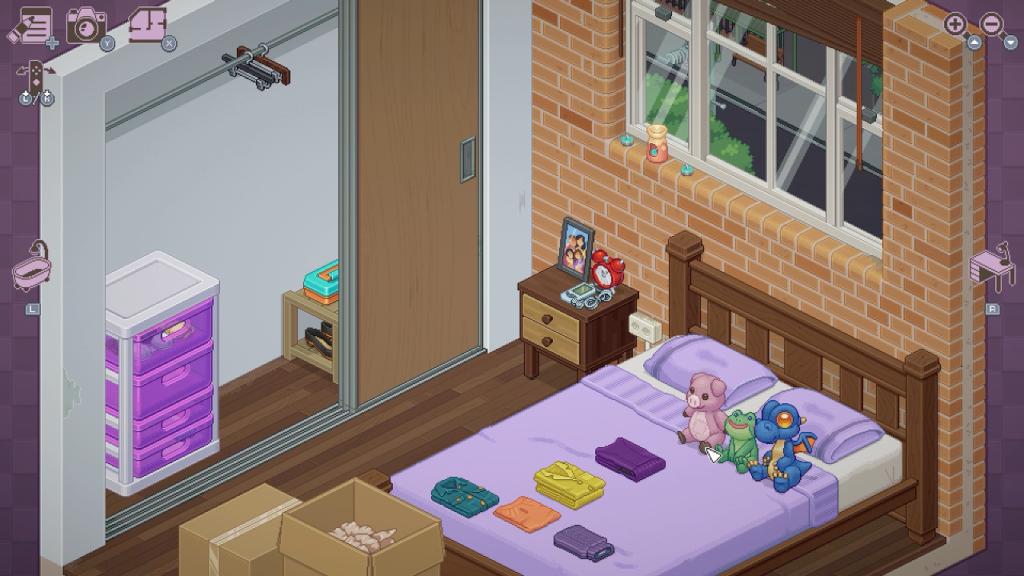
A room can look attractive but still contain incorrectly placed objects.
Focus on satisfying the game’s placement requirements first. Once the required items are arranged correctly, you can complete the level and view the resulting room snapshot.
Collect Stickers Through Special Actions
Unpacking also includes stickers that can be unlocked through achievements and specific interactions.
The community-maintained sticker guide lists 27 stickers. Some are earned by completing levels, while others require actions involving objects in a room.
Examples include turning on a music player, solving a Rubik’s Cube, and building a tower with baby blocks.
Final Thoughts
The best room setup strategy in Unpacking is to satisfy object placement requirements before focusing on appearance. Check red outlines, use each item’s purpose as a guide, and explore special interactions when working toward sticker collection.
For more Android game guides and puzzle tips, visit androidgameguides.com.
FAQ
Can objects be placed anywhere in Unpacking?
Many objects have flexible placement, but some require specific locations.
What does a red outline mean?
It indicates that an object is not in an acceptable position.
How many stickers are in Unpacking?
The community-maintained sticker guide lists 27 stickers.